Core Web Vitals optimization
Core Web Vitals optimization: how to improve LCP , INP and CLS through SEO optimization. Core Web Vitals are a set of three metrics Google uses to evaluate the real user experience on your...

Core Web Vitals optimization: how to improve LCP, INP and CLS through SEO optimization. Core Web Vitals are a set of three metrics Google uses to evaluate the real user experience on your website. These metrics are not theoretical.
If you run a company website, an online store or a business blog, your Core Web Vitals scores directly affect your position in Google's organic results.
A poor score means Google considers the experience on your website below standard, and competitors' pages with better scores will be favored. This article covers each metric in turn, with accessible technical explanations and solutions you can apply right away.
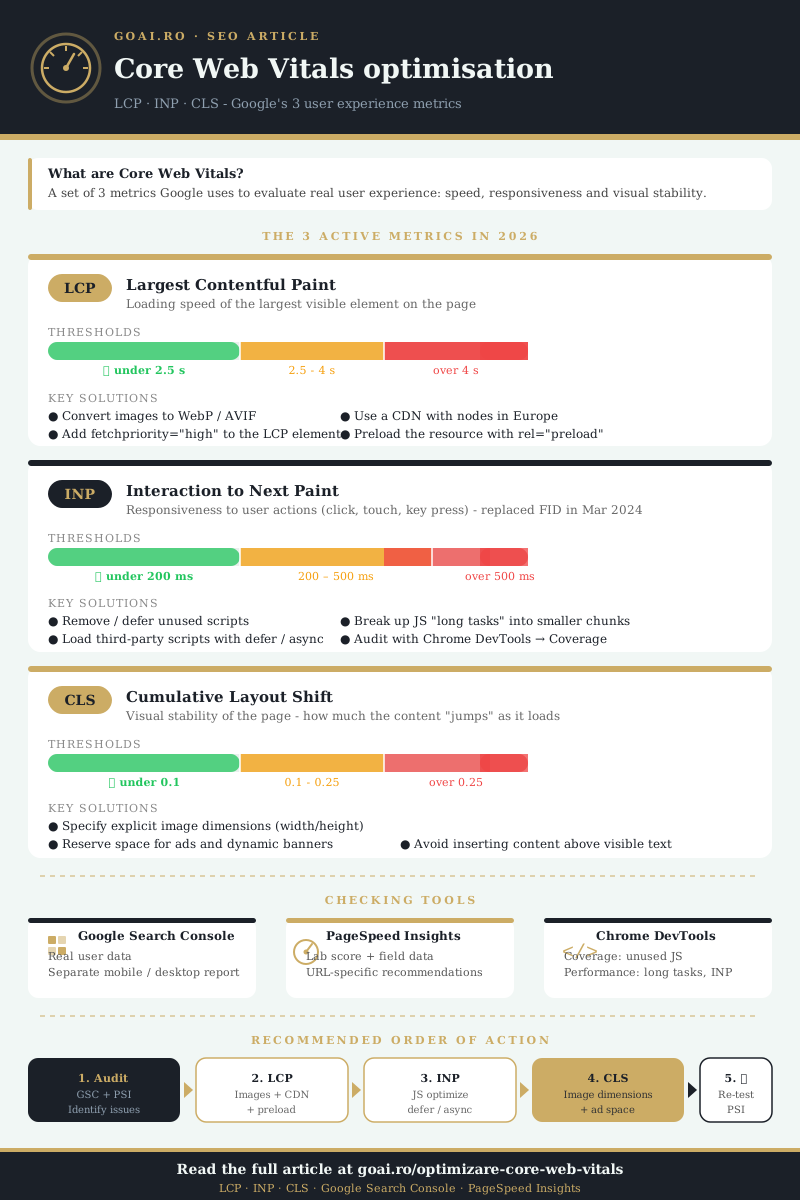
The three metrics active in 2026 are LCP (Largest Contentful Paint), INP (Interaction to Next Paint) and CLS (Cumulative Layout Shift). Each one measures a different aspect of the user experience, and optimizing them requires distinct fixes. Let's take them one by one.
LCP (Largest Contentful Paint), the loading speed of the main element
LCP measures the time it takes for the largest visible element in the viewport to be fully rendered. It can be a hero image, a banner, a large block of text or a video element. Google considers any LCP value under 2.5 seconds good. Between 2.5 and 4 seconds, the score needs improvement. Above 4 seconds, the score is considered poor.
For a Romanian business owner who runs, for example, a company website for a construction firm, LCP is often affected by the main image on the home page.
If that image is 3 MB and is served as a PNG without compression, LCP will certainly exceed the 2.5 second threshold, especially on mobile connections.
What causes a slow LCP
There are a few common causes that increase LCP time and that we see constantly on Romanian websites. Server response time is one of them: if your hosting responds slowly to the first request, everything that follows is delayed.
Render-blocking resources, such as CSS and JavaScript files loaded synchronously in the head section, stop the browser from displaying the main content until it has fully processed them. Unoptimized images, however, remain the main culprit in most cases.
- Convert images to WebP or AVIF. A 1.2 MB JPEG file can drop to 180-250 KB in WebP with no visible loss of quality. If you use WordPress, plugins such as ShortPixel or Imagify do this conversion automatically.
- Add the fetchpriority=”high” attribute to the LCP element. This attribute tells the browser that the main image must be downloaded with top priority, before other resources on the page.
- Use a CDN (Content Delivery Network). If your audience is in Romania, a CDN with nodes in Central Europe reduces latency by 40-60% compared to a server located in the US.
How to check your website's LCP
Go to Google Search Console, the Core Web Vitals section, and you will see a separate report for mobile and desktop.
For detailed analysis, use PageSpeed Insights: enter the page URL and you will get both the lab score and the field data, along with specific recommendations.
INP (Interaction to Next Paint), responsiveness to user actions
INP officially replaced the FID (First Input Delay) metric in March 2024. Unlike FID, which only measured the first interaction, INP evaluates all user interactions throughout the whole visit: clicks, screen taps and key presses. Google takes the worst interaction (with some statistical adjustments) and reports it as the INP score.
A good INP is under 200 milliseconds. Between 200 and 500 ms, the score needs improvement. Above 500 ms, the experience is rated poor. In practice, if a user taps the “Add to cart” button and nothing visible happens for half a second, that page's INP will be penalized.
Why INP is hard to optimize
INP is directly tied to the volume and quality of the JavaScript executed in the browser. When a user interacts with the page, the browser has to run the code tied to that action, recalculate styles, do layout and display the visual result.
If the browser's main thread is blocked by other scripts at that moment, the interaction goes into a waiting queue.
Romanian websites that use several tracking tools (Google Analytics, Facebook Pixel, TikTok Pixel, Hotjar, live chat platforms) often add hundreds of kilobytes of JavaScript that runs on the main thread. Each extra script increases the chance that an interaction will be delayed.
- Remove or defer unused scripts. Use Chrome DevTools → Coverage to see what percentage of each JavaScript file is actually used on the current page. If a script is used under 20%, consider whether you can remove it or load it conditionally.
- Break long JavaScript tasks into smaller chunks. A task that takes 300 ms blocks the main thread completely for that time. If you split it into three tasks of 80-100 ms each, the browser can process user interactions in between.
- Load third-party scripts with the defer or async attribute. The defer attribute lets the browser keep parsing the HTML without waiting for that script to download and run.
This technique is called lazy loading for third-party scripts and can reduce INP by 30-50% on the affected pages.
CLS (Cumulative Layout Shift), the visual stability of the page
CLS measures how much the visible elements of the page move during loading, without the user having initiated any action. A good CLS score is under 0.1. Between 0.1 and 0.25, the score needs improvement. Above 0.25, the experience is rated negatively.
The classic situation: you open a page on your phone and start reading a paragraph, and just as an ad banner or an image loads above the text, the content suddenly jumps down.
Common causes of a high CLS
Images and video elements without explicit dimensions are responsible for most CLS problems. When the browser doesn't know the size of an image before downloading it, it reserves zero space for it.
When the image arrives, all the content below it shifts. Web fonts that load late and replace the system font also cause shifts, because character sizes differ between the two fonts.
- Specify the width and height attributes on all img and video elements. The browser will calculate the aspect ratio and reserve the right space before the resource is downloaded. In CSS, you can use the aspect-ratio property for the same effect.
- Use font-display: swap combined with font preloading. Add a link rel=”preload” tag for the font files and set font-display: swap in the @font-face declaration. The browser will show the text immediately with the system font and switch to the web font when it becomes available, minimizing the shift.
- Avoid dynamically inserting content above existing content. If you have a cookie consent banner, a notice or a promotional message that appears at the top of the page, reserve its space in CSS from the start, even if it is initially empty.
If those sections don't have a minimum height defined in CSS, loading them will push the rest of the page down. The solution is to define min-height on that container, estimating the height of the content that will be inserted.
The direct link between Core Web Vitals and SEO optimization
Google confirmed as far back as 2021 that page experience (Page Experience) is a ranking factor. Core Web Vitals are the central component of this signal. SEO optimization is not limited to keywords, backlinks and content, it also includes the technical performance of your website.
When two competing pages have similar quality content and comparable link profiles, Core Web Vitals scores can make the difference in the ranking in Google's organic results. A website with an LCP under 2 seconds, an INP under 150 ms and a CLS under 0.05 has a real advantage over a competitor with borderline or poor scores.
Modern SEO optimization treats Core Web Vitals as an integral part of the technical strategy, not as an optional extra.
Google Search Console reports these metrics separately for mobile and desktop, and pages with poor scores are explicitly marked as “URLs need improvement” or “Poor URLs”. These reports show exactly how many pages are affected and which specific metric is causing the problem.
A practical Core Web Vitals optimization process for Romanian websites
If you run a website and want to improve the scores, follow a structured process instead of applying random fixes. Start with a full audit in Google Search Console to identify the metric that affects the most pages.
Often, a single problem (for example, images without dimensions or a JavaScript script that blocks the main thread) affects hundreds of pages at once.
After identifying the main problem, apply the fix to a small group of pages and monitor the results for 28 days.
The field data in Google Search Console is updated based on a rolling 28-day window, so you will only see the real impact of the changes after this period.
Prioritize the pages with the most traffic. An LCP improvement on the home page or on the most visited category pages will have a much bigger impact on the overall score than optimizing a page with 10 visits a month.
The PageSpeed Insights tool lets you test individual pages, and the Web Vitals Chrome extension shows you the scores in real time while you browse your own website.
The recommended order of work
Start with LCP, because the improvements are usually the most visible and the easiest to implement: image compression, WebP format, preloading the LCP resource, checking server response time.
Then move on to CLS: add dimensions to images and video, reserve space for dynamic elements. INP is usually the last metric tackled, because it requires more complex fixes at the JavaScript code level.
The process of SEO optimization through Core Web Vitals is not a one-off action. Every change to the website, a new theme, an added plugin, an extra tracking script, can affect the scores.
Monthly monitoring in Google Search Console and periodic testing with PageSpeed Insights should be part of the routine administration of any business website.
Core Web Vitals scores are not just technical numbers. They reflect the concrete experience of every visitor and directly influence both the positions in Google's organic results and your website's conversion rate.
Source references
Dorel Tănase
Original author at GOAI. Published here in English with permission.
