Read an audit report
Each audit report is organised into tabs so you can go from the headline score to the exact check that failed. This guide walks through every tab using a real report.
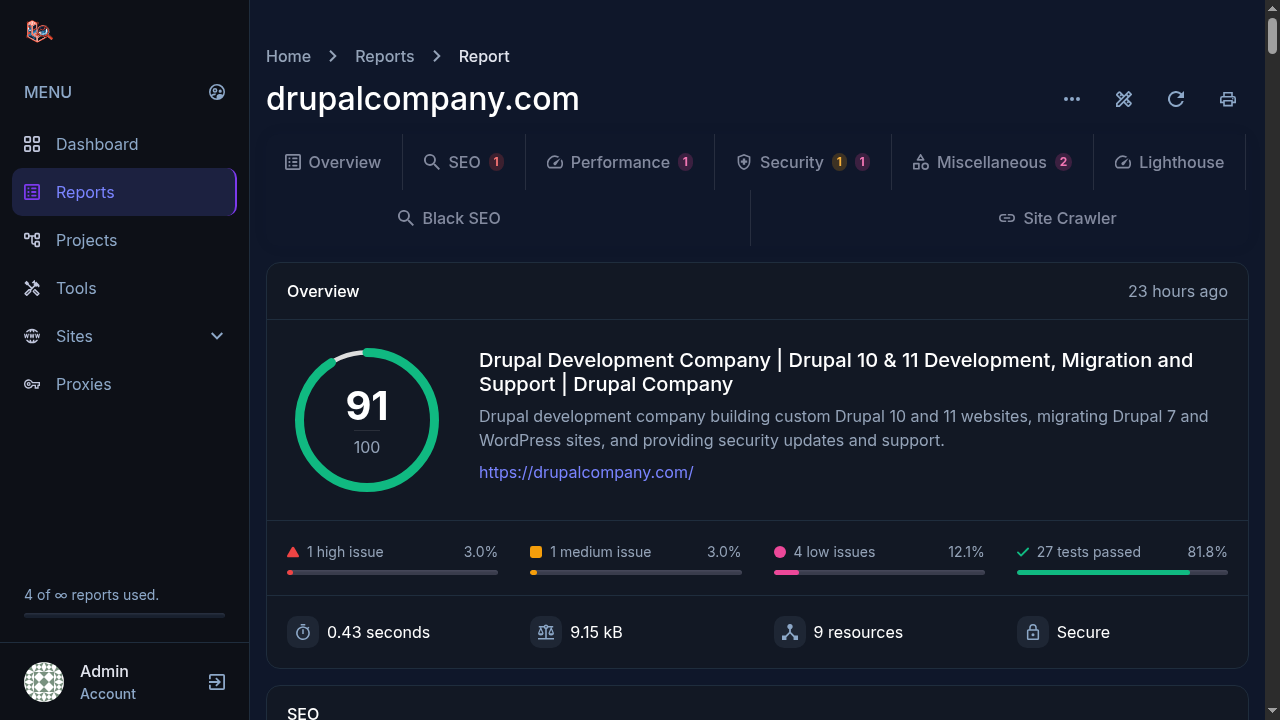
Overview
The landing tab. You get the score ring, the page's title and meta description as Google would see them, and the issue summary: how many high, medium and low issues were found and how many tests passed. Underneath sit the raw page stats: load time, page weight, resource count and whether the connection is secure.
In the report above: 1 high issue, 1 medium, 4 low, 27 tests passed, a 0.43 second load time and a 9.15 kB page. That is what a healthy site looks like.
SEO
The on-page checks: title and meta description length, headings structure, image alt attributes, links, canonicals, Open Graph tags and indexability. The counter on the tab tells you how many issues live there before you open it.
Performance
What slows the page down: response time, page size, number of requests, compression and caching headers. Fix these first when the score drops; they are usually the cheapest wins.
Security
HTTPS configuration and the response headers that protect visitors: HSTS, content-type options, frame protection and friends. A missing header shows up here with the exact name to add.
Lighthouse
A full Google Lighthouse audit of the same URL, inside the report, so you do not have to run it separately. You can also run Lighthouse as a free standalone tool without an account.
Black SEO
Checks for patterns search engines penalise: hidden text, keyword stuffing, sneaky redirects and similar black-hat signals. Useful when you inherit a site and want to know what the previous SEO actually did.
Site Crawler
Crawls the site beyond the single page you scanned, following links within the limits you set, and reports broken links and dead ends. Maximum pages and crawl depth are configurable, and you can import a sitemap to seed the crawl.
What to do with a bad score
- Fix the high issues first; they move the score the most.
- Re-run the audit on the same URL after deploying the fix.
- Compare the new report with the old one in your reports list to confirm the issue count went down.
Try it yourself
Everything in this tutorial runs in the live app.
