Monitor site health at scale
One-off audits tell you about one page. The Sites section checks whole lists of domains for liveness and status, which is how you watch a network of sites without opening each one.
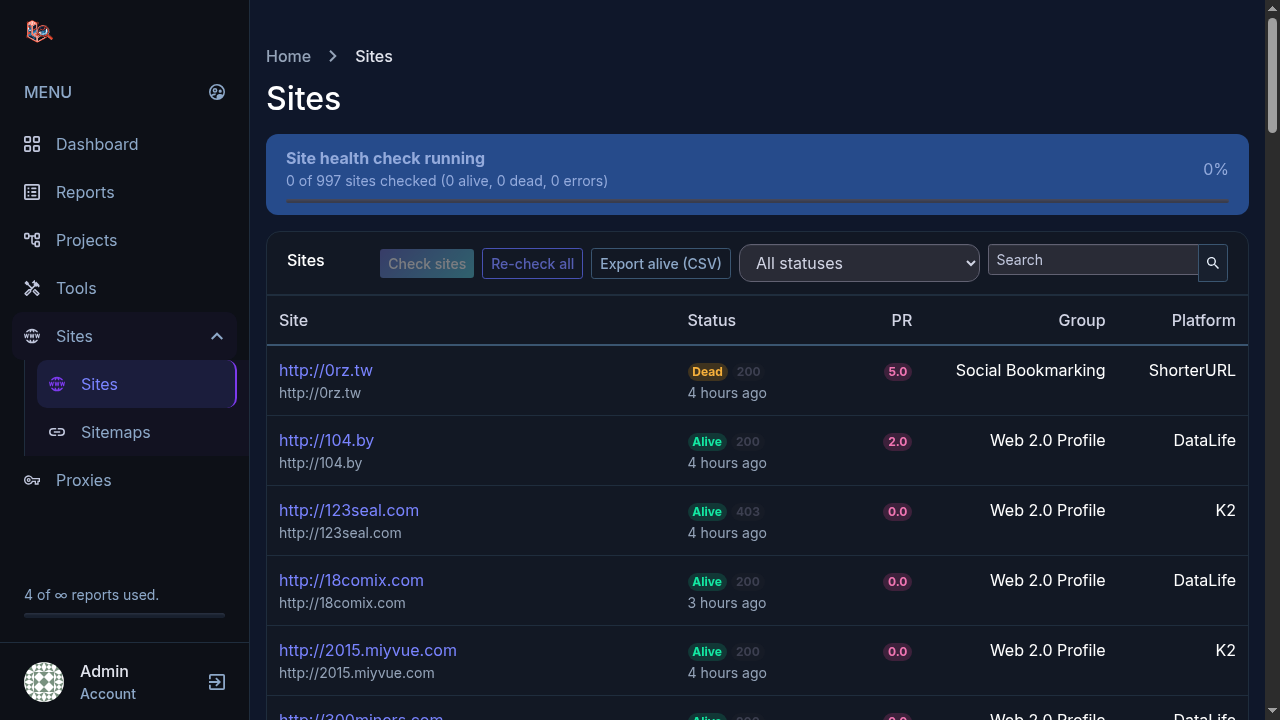
What a check tells you
Every row in the list carries:
- Status: Alive or Dead, with the HTTP status code the site returned (200, 403 and so on).
- When it was last checked, so you know how fresh the reading is.
- Group: the category the site belongs to in your list.
- Platform: the software the site runs on when it can be detected.
Run a check
- Open Sites in the left menu.
- Click Check sites to check sites that have no recent reading, or Re-check all to refresh the whole list.
- The progress bar at the top shows how many sites were checked and how many came back alive, dead or with errors.
A site only counts as alive when it actually serves a page. A domain that resolves but returns nothing useful is marked dead, which is what you want when you are cleaning a large list.
Filter and export
Use the status filter and search box to narrow the list, then Export alive (CSV) to download just the live sites. That export is the clean input for the next step of whatever you are doing with the list.
Sitemaps
The Sitemaps entry under Sites manages the sitemaps for your properties, including pinging search engines when a sitemap changes.
Try it yourself
Everything in this tutorial runs in the live app.
