Google Consent Mode v2 and SEO Optimization
Google Consent Mode v2 and SEO optimization: what you need to know as a business owner. Google Consent Mode v2 is an update to the protocol for managing user consent, officially launched by...

Google Consent Mode v2 and SEO optimization: what you need to know as a business owner.
Google Consent Mode v2 is an update to the protocol for managing user consent, officially launched by Google in November 2023 and made mandatory for the European area starting in March 2024.
If you have a website that runs Google Ads, Google Analytics 4 or any other Google product that collects data, this setup concerns you directly.
Google Consent Mode v2
The reason Google introduced this improved version is legislative pressure in the European Union, in particular the General Data Protection Regulation (GDPR) and the ePrivacy directive.
In practice, Google had to create a mechanism through which its platforms respect the user's decision to accept or refuse cookies, without completely losing the ability to model and estimate conversions.
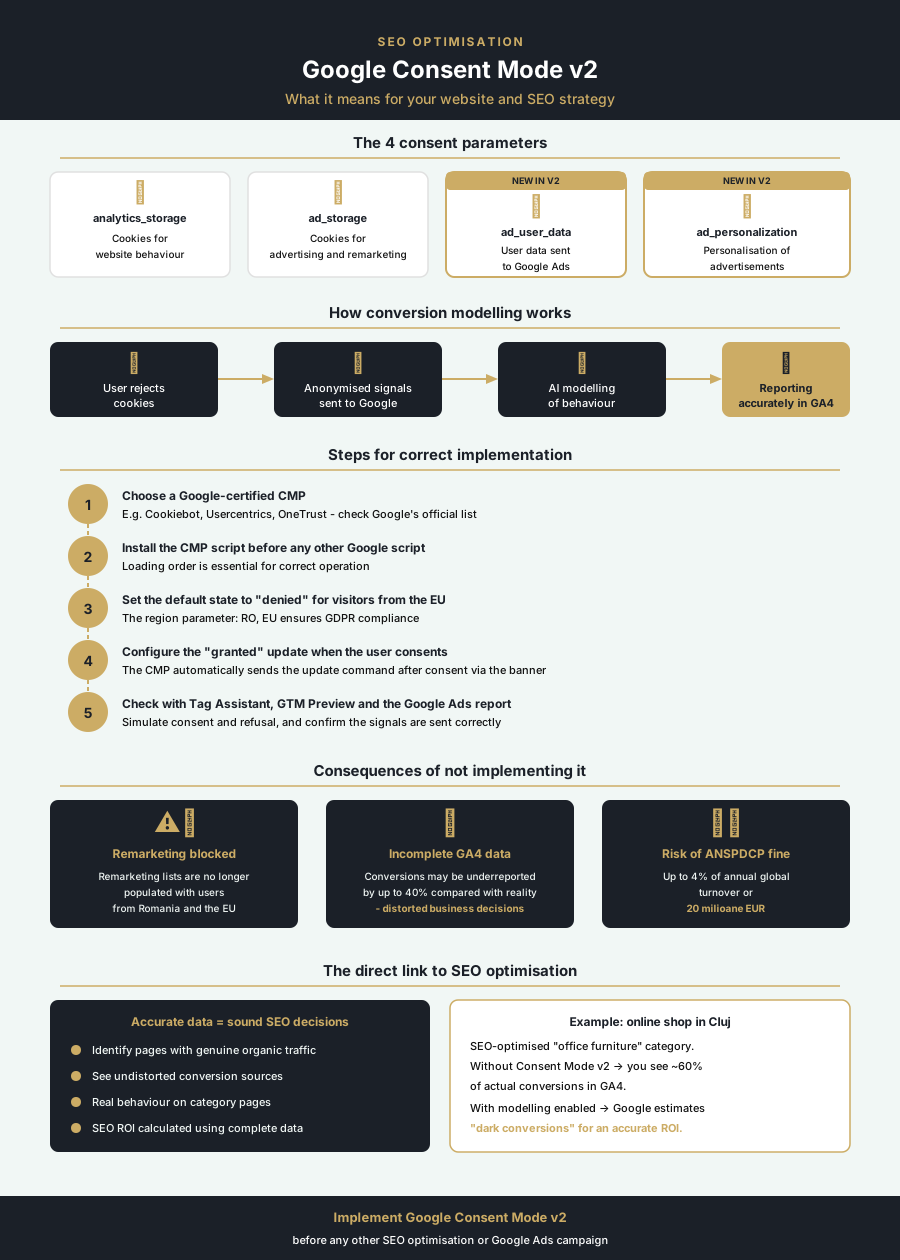
Compared with the previous version, Consent Mode v2 introduces two new parameters: ad_user_data and ad_personalization. These are added to the existing ones, analytics_storage and ad_storage, and complete the set of signals that Google uses for reporting and for optimizing ad campaigns.
Why Google Consent Mode v2 was created
The problem Consent Mode v2 solves is a practical one: if a user refuses cookies, Google platforms can no longer track their behavior directly.
Google's solution was data-driven modeling, conversion modeling. When a user does not give consent, Google uses the available signals (anonymized and aggregated) to estimate likely behavior. The result is a more accurate picture of campaign performance, even without complete cookies.
The four consent parameters and what each one controls:
- analytics_storage: controls whether Google Analytics can store cookies to measure behavior on the website
- ad_storage: controls the cookies used for advertising and remarketing
- ad_user_data: controls whether user data can be sent to Google for advertising purposes
- ad_personalization: controls whether ads can be personalized based on the user's history
How to install Google Consent Mode v2
A correct implementation involves two distinct components: a Google-compatible consent management platform (CMP, Consent Management Platform) and the actual configuration of the code on the website.
The Google Tag Manager route
The most accessible method for a business owner who has no permanent developer is integration through a Google-certified CMP, connected to Google Tag Manager. Platforms such as Cookiebot, Usercentrics or OneTrust have native integrations with GTM and generate the required code automatically.
The general steps are:
- Choose a Google-certified CMP and create an account: most offer a free plan for small websites
- Install the CMP script on the website, before any other Google script (this is mandatory)
- Set up in GTM a tag of type "Google Consent Mode" that takes the values from the CMP
- Set the default state (default state) for users in the European area to "denied" for all parameters
- Publish the changes and test through the Preview mode in GTM
The direct code route
If you prefer manual implementation or have a developer available, the basic code looks like this, placed before the gtag.js tag in the section:
window.dataLayer = window.dataLayer || [];
function gtag(){dataLayer.push(arguments);}
gtag('consent', 'default', {
'ad_storage': 'denied',
'analytics_storage': 'denied',
'ad_user_data': 'denied',
'ad_personalization': 'denied',
'region': ['RO', 'EU']
});
When the user accepts cookies through your banner, the CMP sends an "update" command. This changes the values from "denied" to "granted" for the accepted parameters.
Verifying the implementation
After installation, check that everything works correctly using:
- Google Tag Assistant: the Chrome extension that shows in real time which consent signals are being sent
- Preview mode in GTM: lets you simulate a user who accepts or refuses cookies
- The diagnostics report in Google Ads: flags whether the Consent Mode implementation is detected correctly at the account level
The consequences of incorrect or missing setup
If you had not implemented Google Consent Mode v2 by March 2024 and you run Google Ads campaigns in Romania or anywhere in the European Economic Area, the consequences are concrete and clear.
First, Google may restrict or suspend remarketing and ad personalization features for European traffic. That means your remarketing lists no longer fill up correctly with users from Romania. And campaigns based on custom audiences become ineffective.
Second, the data in Google Analytics 4 becomes incomplete without the modeling provided by Consent Mode. Your reports show less traffic than actually exists. Conversions are under-reported, and the business decisions you make based on this data are distorted.
From the perspective of SEO Optimization, the impact is indirect but real. A website that does not meet consent requirements can be penalized in technical audits. And the behavioral signals from Google Analytics, if collected incorrectly, can affect your understanding of which pages perform and which do not.
The legal risk should not be ignored. The national data protection authorities of EU member states, including ANSPDCP in Romania, can impose fines for collecting data without valid consent.
Google Consent Mode v2 and the SEO optimization strategy
Many business owners treat Consent Mode as a strictly technical or legal issue. In reality, it is directly tied to the quality of the data you use to make marketing decisions, including those related to SEO Optimization.
When GA4 data is collected correctly, with Consent Mode active and conversion modeling working, you have access to more accurate information about:
- which pages generate the most organic traffic and how that traffic behaves
- what the real conversion sources are, not those distorted by missing data
- how users from different regions of Romania behave on your pages
The rest are "dark conversions", real buyers who don't show up in reports because they refused cookies. With modeling enabled through Consent Mode v2, Google estimates those conversions and includes them in reporting. This way it gives you a more accurate picture of the return on your investment in SEO.
Choosing the right CMP for a business in Romania
The CMP market is varied. For a small or medium business in Romania, the practical selection criteria are:
- Google certification: check the official list of partner CMPs on Google's website. Only these guarantee correct integration with Consent Mode v2
- Romanian language support: the cookie banner must be in Romanian for users in Romania, in line with GDPR requirements
- Cost: platforms such as Cookiebot offer free plans for websites with up to 100 pages, enough for many local businesses
Google Consent Mode v2 is not optional for any website that uses Google products and has visitors from the European Union. A correct implementation protects both legal compliance and the quality of marketing data.
If you haven't set up this feature yet, prioritize it before any other SEO Optimization or paid advertising action. Correct data is the foundation of any functioning digital strategy.
Source references
Dorel Tănase
Original author at GOAI. Published here in English with permission.
